Funnalized
DEENTell me when it starts
World B · for companies

From the first click to the paid invoice — one piece of work, one system.

Two engines, one system: winning customers and winning staff. Both run through the same system as one continuous piece of work — with no switching tools and no double maintenance. Choose your engine and walk the route station by station.

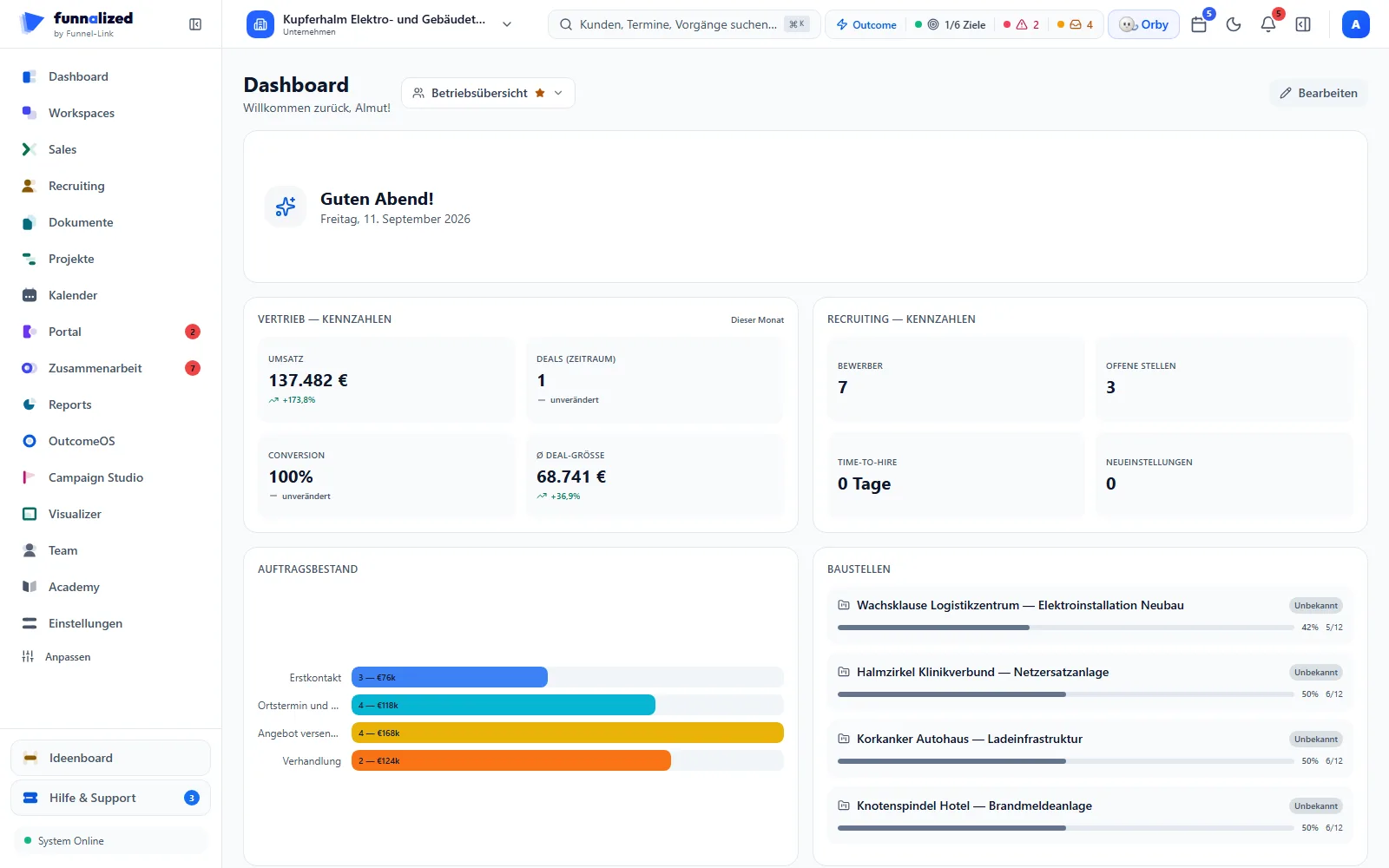
Das Dashboard des Beispielbetriebs: Kennzahlen aus Vertrieb und Recruiting, Auftragsbestand, Baustellen.
  • 0records in the pipeline
  • €1.3Mopen quote value
  • 0invoices from the same records

Screens from a demo workspace. Companies, people and figures are fictitious.

The work · two engines

Two engines, one system.

Choose your engine — the journey below it tells itself in that engine’s language. You do not have to commit: both routes run through the same system.

Choose an engine

From the first click to the paid invoice

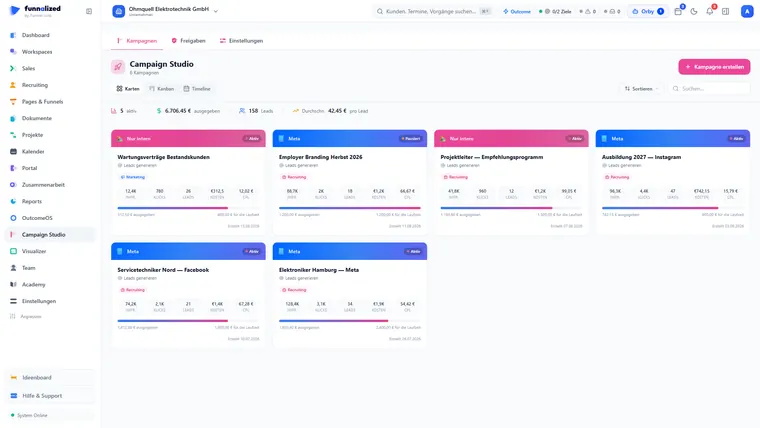
Campaign Studio: the campaign overview as a card grid — per card the channel (Meta or internal), the objective, the daily budget, the spend so far and a status marker.
01 · Kampagne

The campaign

In Campaign Studio you plan, budget and approve your Meta ads — and publish them straight from the app. Every ad link takes its marker along as it goes: later on you can say of any lead which single ad brought them in. Not a mandatory step: your funnel collects without paid ads too.

attribution runs automaticallyCampaign Studio
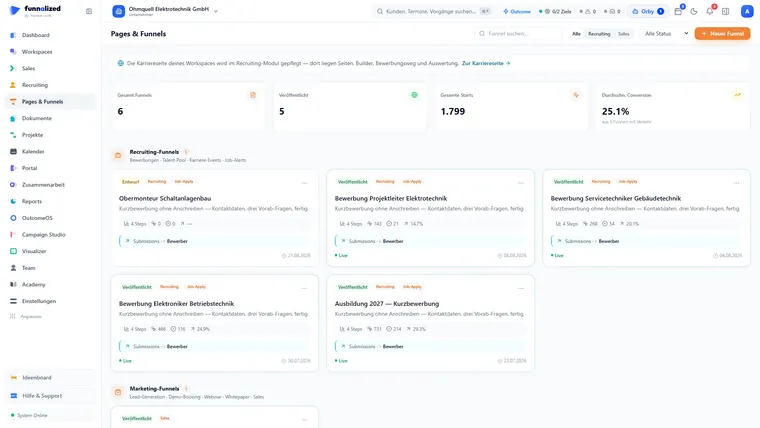
Pages & Funnels: funnel overview with the tiles “5 funnels in total” and “4 published” — per card the publication status, step count, starts and conversion; below the group “recruiting funnels (4)” the group “marketing funnels (1)” begins, with the keywords lead generation, demo booking, webinar and whitepaper.
02 · Funnel

The funnel

Build the landing page or the funnel without code — from around fifty blocks: appointment booking without double bookings, screening questions, file uploads. Published immediately at your Funnalized address — on your own domain if you want.

you build it — oncePages & Funnels
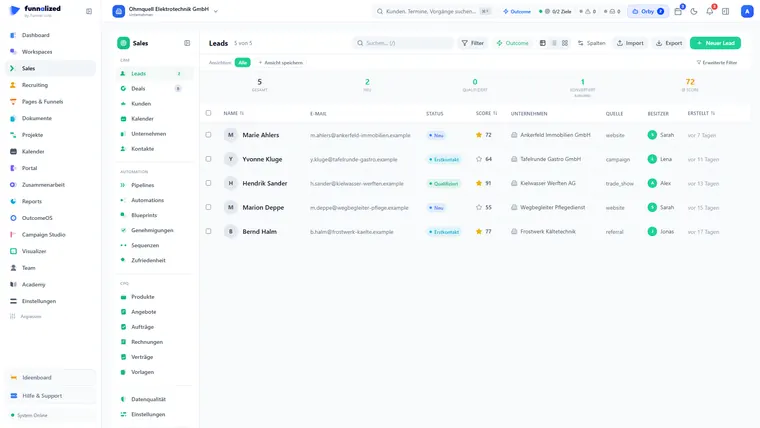
Leads in the sales module as a table with the columns name, email, status, score, company, source, owner and time of creation; above them the metrics for leads in total, new, qualified and converted as well as the average score.
03 · Lead

The lead comes into being by itself

The visitor submits the form — and a lead is standing in the CRM, source included. No Zapier, nothing in between: the completed form is the lead. And it carries its own origin — if the visitor came through an ad, that ad’s campaign counts, otherwise the one you stored on the funnel. Or import your existing base by CSV — the app catches duplicates.

runs automaticallyVertrieb & CRM
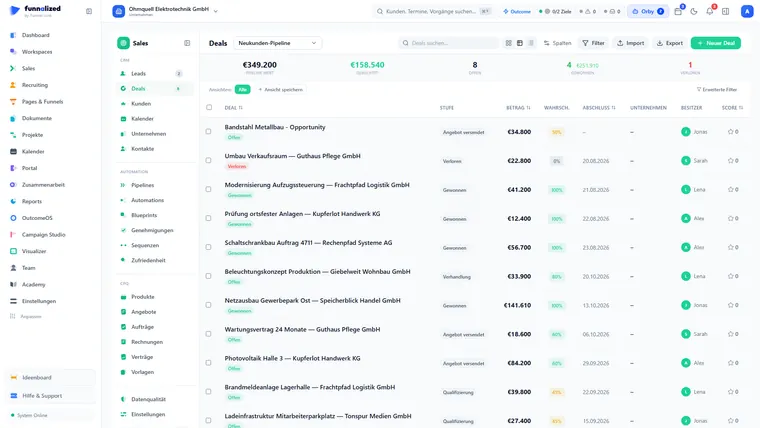
Deal pipeline as a kanban board with the columns first contact, qualification and quote sent — per card the piece of work, the customer, the value and the close probability; above them the metrics for pipeline value, weighted value and open deals.
04 · Deal

Qualify and convert

The system assigns score and tier by your rules. One click turns the lead into a deal, a contact and a company in one go — the lead is kept with its full history, and running sequences travel along. Blueprints guide every stage of the pipeline: mandatory fields and permitted stage changes are checked by the app at the moment of the change — it does not rest on your people’s discipline.

scoring automatic · converting = one clickVertrieb & CRM
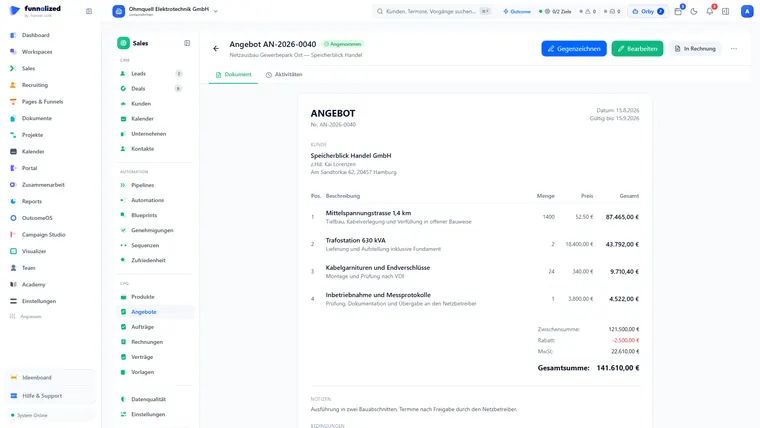
A quote on the “document” tab, status “draft”: the finished quote document with the customer’s address, its date and validity date and three line items — each with quantity, price and total — below them subtotal, discount, VAT, grand total and the payment terms; above them the buttons to send, to edit and to convert it into an invoice.
05 · Angebot

The quote that looks after itself

The app applies the right price by itself: customer price before tier price before base price. On sending, a link is created — your customer opens it with no sign-in and no app and signs with legal effect. Recorded with it are the IP address, the moment in time and a checksum of the signature. Above an amount you set yourself, someone internally has to approve before the quote goes out.

price, link and proof automaticVertrieb & CRM
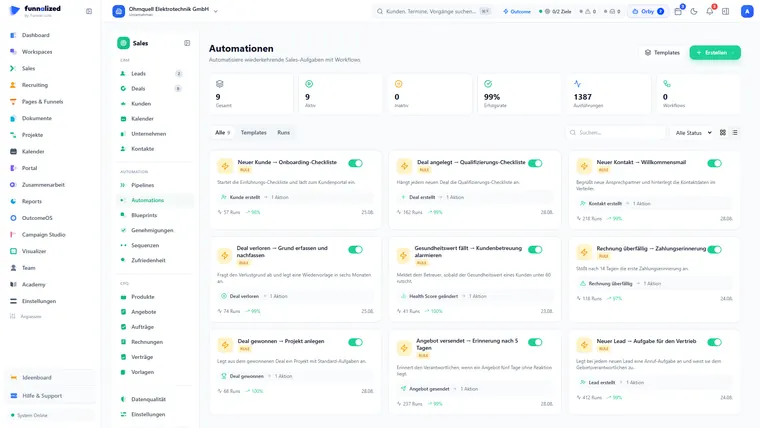
The automations overview inside the sales module: at the top the metrics for active and inactive automations, success rate and runs, below them the individual automations as cards with an on/off switch and their number of actions — on the left the module navigation with CRM, automation and CPQ.
06 · Auftrag

Accepted → the order comes into being on its own

When your customer says yes in the link, an automation creates the order along with all its line items. You type nothing and copy nothing.

runs automaticallyAutomationen
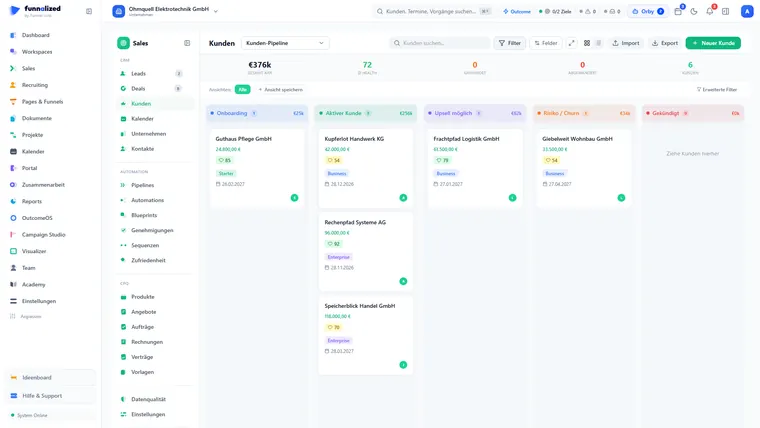
The customer pipeline in sales as a kanban board: the stages onboarding, active customer, upsell possible, at risk / churn and cancelled side by side, each column header showing its count and ARR — in “onboarding” the card of a freshly created customer with contract value, health score and tier badge.
07 · Kunde

Won → the customer comes into being on its own

Drag the deal to “won” — an automation that ships with the app creates the customer. The order becomes the invoice, you record payments yourself or confirm what your customer reports, and the app marks overdue invoices hourly on its own.

customer automatic · overdue invoices hourlyVertrieb & CRM
The customer pipeline in sales as a kanban board with the stages onboarding, active customer, upsell possible, at risk / churn and cancelled — per customer card the contract value, health score and tier badge; above them the tiles for total ARR, average health, at-risk and churned customers as well as the customer count.
08 · Betreuung

Look after them instead of forgetting them

The health score comes out of last contact, open tickets, portal use and overdue invoices. Once a day it is recorded — so you see not just where it stands but which way it is going. If it falls below your threshold, an automation that ships with the app reports in by itself. In the portal carrying your logo the customer sees documents and tickets and chats in real time; the app asks after satisfaction automatically by a link of its own — a survey page in your design, with no sign-in. Contract renewal including the ARR comparison stays in view.

runs automaticallyKundenportal
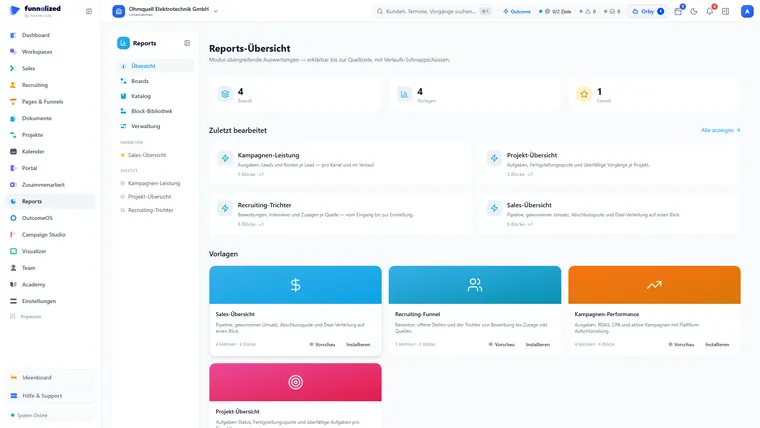
The reports overview: the tiles for boards, templates and favourites, below them the most recently edited board “sales overview” with its block count and the four templates sales overview, recruiting funnel, campaign performance and project overview, each with a preview and an install button.
09 · Report

Measure what works

Reports read every module and let you unfold any figure down to the single piece of work it came out of; report emails arrive on a schedule. And honestly: everything can be traced back to the individual ad — the data for it is ready.

you build the board · history and emails automaticReports

Screens from a demo workspace. Companies, people and figures are fictitious.

No step is typed twice — every record travels to the next station automatically. That is the difference between many tools and one file.

Several sites

With several sites too — one workspace per site.

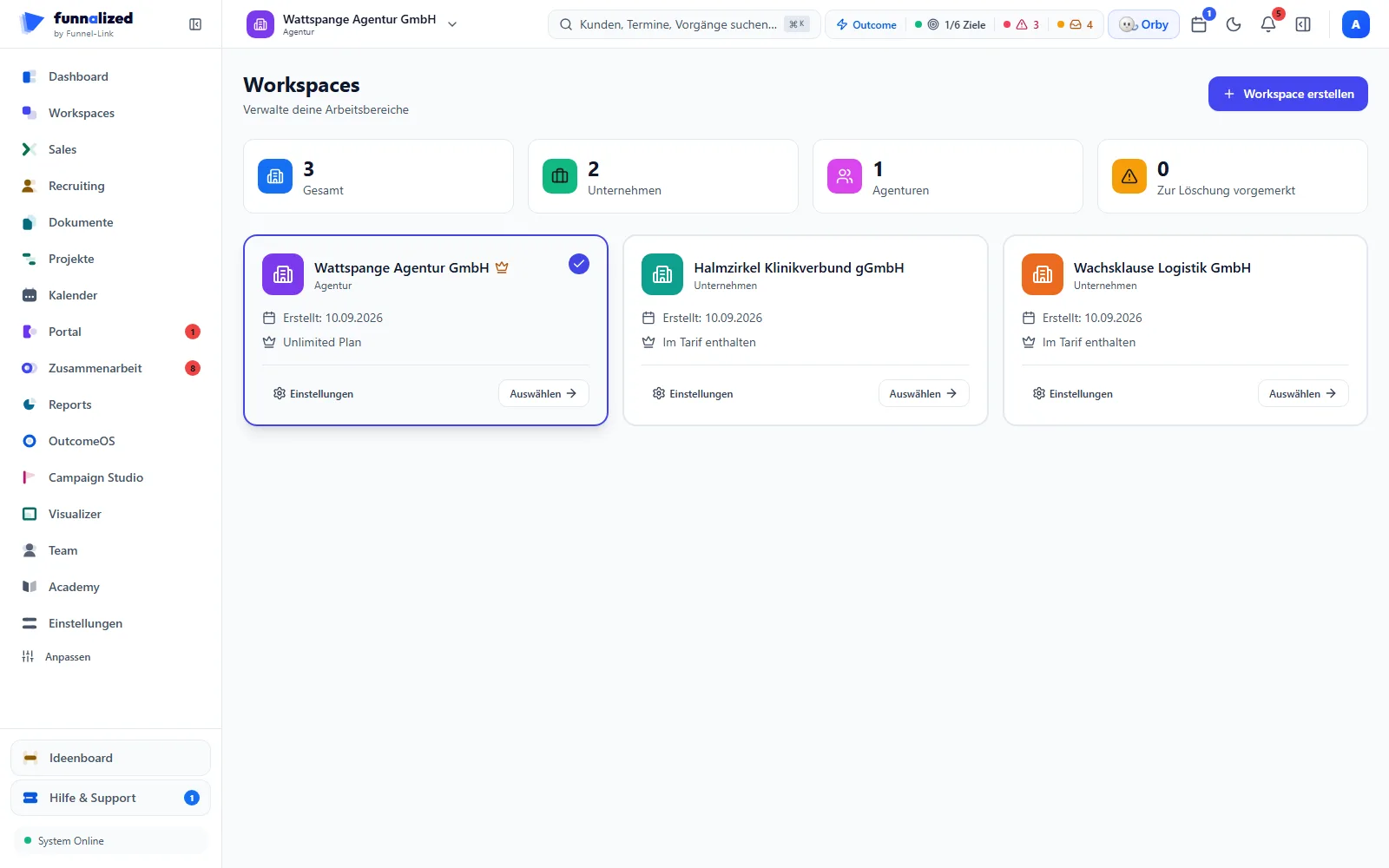
You run more than one site? Then each gets its own workspace — cleanly separated but centrally steered. What clients are to agencies, sites are to you.

  1. 01

    One workspace per site

    Every site runs in its own, strictly separated sub-workspace — administered centrally from your main workspace. The same mechanism agencies use to run their clients.

  2. 02

    Release down to field level

    Per site you decide which modules are visible and who sees which fields — a switch in the settings, plus permissions down to the single field. And every access is checked against the site it belongs to: no membership there, no data.

  3. 03

    One click changes the site

    No second sign-in, no export: your people change site with one click and work together in the same file.

  4. 04

    The second site is not built from scratch

    Take your fully set up main workspace as the template — or a site that is already running. Roles with their permissions, custom fields, sales and recruiting pipelines with every stage, automations, sequences, blueprints, email and document templates, saved views, tags and the company details all come along into the new workspace — together with selected team members in their roles, if you want.

HauptworkspaceHead office · one login

The founder deal covers your main workspace plus one site; every further site is €100 a month.

See the pricing
For the record · verifiable

From the code, not from the brochure

  • 21 modules, one system

    Sales, recruiting, marketing, projects and the portal work into each other — one record instead of ten islands.

  • Separated down to the single row

    Every access names its workspace and runs through the same check — no membership there, no answer, and the query behind it stays bound to it too. Hard tenant separation, no mixing.

  • 141 triggers, 73 actions

    The nervous system of the app: events set the next steps off automatically — right across every module.

  • Germany, GDPR-compliant

    Hosted in Germany, legally binding signatures with a traceable record of proof — and consent is captured in the same step as the record itself.

Questions · before you decide

What businesses ask before they decide.

Answered briefly, every answer evidenced

Is there a CRM with recruiting built in?

Yes. Funnalized runs sales and recruiting in one system — 21 modules, one body of data. The open job, the candidate on it, the won deal and the project that follows all sit in the same file, with the same permissions and the same automation. No second tool, no export, no double maintenance.

Is Funnalized GDPR-compliant?

The Funnalized servers stand in German data centres, and the data processing agreement under Art. 28 GDPR is published openly. Every access is checked against the workspace it belongs to, consent is evidenced with a timestamp, and retention periods run out automatically — rejected candidates are deleted by the app itself once the period ends. Which processors are involved and where they sit is set out in full in the DPA and on the security page.

What does Funnalized cost?

€150 a month for your main workspace — not per user. Whether three or thirty people work in it makes no difference to the price. The first 50 paying teams pay €50 instead of €150 permanently, with a second workspace included; every further one costs €100 a month.

Can I try Funnalized for free?

Yes, for 14 days and with no credit card. The trial ends by itself — no costs arise if you do nothing further. Your workspace then stays readable and your data stays available for export for 30 days; you can carry on working as soon as you book a plan. If you book nothing, the trial workspace is deleted after those 30 days (terms § 3 (2)).

What happens to my data if I cancel?

After the contract ends you can export your data yourself for 30 days, in common machine-readable formats (CSV, JSON). It is then deleted; backups that still contain deleted data are overwritten with the regular backup cycle. The only exception is what has to be kept by law. Set out in the terms § 9 and the DPA § 9.

Not your world?

Do you look after clients as an agency?

First your own engine, then your product — the whole cycle, ready to resell.

To the agency world

One message at launch. After that you'll find me in the top right of the app.

Your whole business in one file.

Put yourself on the waiting list — we will tell you first when registration opens. The first 50 paying teams secure the founder deal permanently. One message, not a newsletter.

€50€150/ month · permanently

Waiting list

Only your email address. No spam, unsubscribe at any time.

See the other world

€50€150/ month · permanently

50 founder placesTell me when it starts